NFPA 25

NFPA 25 inspection software for water-based fire protection systems.

Wet pipe, dry pipe, fire pumps, standpipes, private fire service mains, water tanks and control valves: each with its own NFPA 25 form, filled in on a phone and sent to the customer before you leave the riser room.

The forms

What your inspectors record.

Wet pipe sprinkler system

NFPA 25, Chapter 5
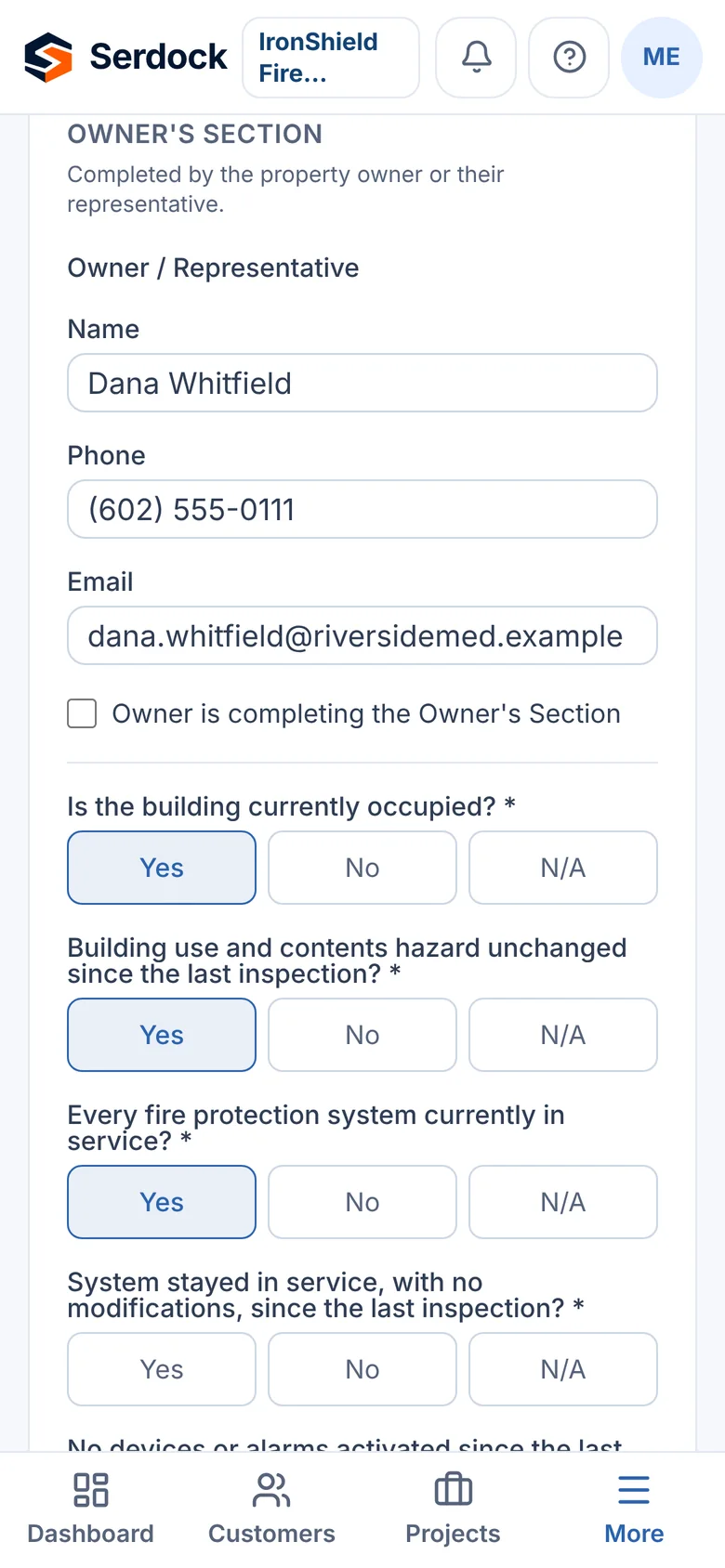
  • The owner's section: occupancy and hazard unchanged, systems in service, no activations since the last visit
  • The interval the report covers: monthly, quarterly, annual, third year or fifth year
  • Gauges, control valves, alarm devices, backflow preventers, hydraulic nameplate and spare sprinklers
Dry pipe sprinkler system

NFPA 25, Chapter 5 and 13
  • The wet pipe checks, plus the dry-pipe valve, its air and water pressures, and the partial-flow trip test
  • The quick-opening device, and the valve enclosure kept at 40°F or above

Fire pump inspection and test

NFPA 25, Chapter 8
  • The pump's rating: capacity, pressure and speed
  • Weekly and monthly checks of the pump room, valves, controller and diesel driver
  • The no-flow (churn) test and the annual flow test at churn, 100% and 150% of rated flow

Standpipe and hose system

NFPA 25, Chapter 6
  • Hose connections, valves, pressure-regulating devices and the fire department connection
  • Main drain readings, and the 5-year flow and hydrostatic tests

Private fire service mains

NFPA 25, Chapter 7
  • Hydrants operated, drained and flushed; monitor nozzles and strainers
  • Static, residual and flow readings compared with the last test

Water storage tank

NFPA 25, Chapter 9
  • Water level and temperature, heating, vents and the structure
  • Level alarms, and the interior inspection on its 3- or 5-year interval

Valves and control valves

NFPA 25, Chapter 13
  • Every control valve open, sealed or supervised, and operated through its range
  • Main drain test, alarm valves, check valves and pressure-reducing valves

Acceptance hydrostatic test

NFPA 13
  • Test and static pressure, duration and pressure drop, witnessed by the AHJ or owner
  • The contractor's material and test certificate, parts A and B
A wet pipe sprinkler inspection on a phone: the owner’s section answered Yes, No or N/A

On an inspector’s phone

Why it works in the field

One form per system

A building with a fire pump, a tank and three risers gets a report for each, all kept against the same building.

Written for NFPA 25

Each form follows its NFPA 25 chapter and says what it covers, so the inspector and the reviewer both know which standard the report answers to.

Readings on the record

Main drain, flow test and pump readings are kept on every report, and the form asks whether they are consistent with the last test.

Every inspection

And what every report in Serdock gets.

On a phone, on site

Forms built for one hand on a ladder: Yes / No / N/A answers, photos and voice notes, and nothing typed twice.

Deficiencies kept

Every "No" becomes a deficiency on the building and the device, with its severity, ready to quote.

Signed, sealed and sent

The inspector signs on screen, the report is sealed against changes, and the PDF reaches the customer the same day.

The next one scheduled

Submit an inspection and the building's next one is set from its interval, with reminders for your office and the customer.

Device tags with a QR code

Print tags for devices and buildings. A scan shows the inspection history and the next due date, on your own website.

In the customer's portal

Property managers see every report and open deficiency for their buildings, and approve repairs online.

Questions

Which NFPA 25 systems does Serdock have forms for?
Wet pipe and dry pipe sprinkler systems, fire pumps, standpipe and hose systems, private fire service mains, water storage tanks, and valves and control valves, plus the NFPA 13 acceptance hydrostatic test. Each is a module you turn on for your company.
Does Serdock handle monthly, quarterly, annual and 5-year intervals?
Yes. Each report records the interval it covers, and each building's systems carry their own inspection frequency, so submitting an inspection schedules the next one.
Can we use our own inspection form?
Yes. The form builder in Settings makes a company form of your own, which your inspectors fill in the same way as the built-in ones.

See it with your own work in mind.

A 30-minute walkthrough, on the inspections and jobs you actually do.